

Extensive Library
Live Sports
HD Video Quality
Ad-Free Entertainment
Picture-in-Picture
Offline Downloads
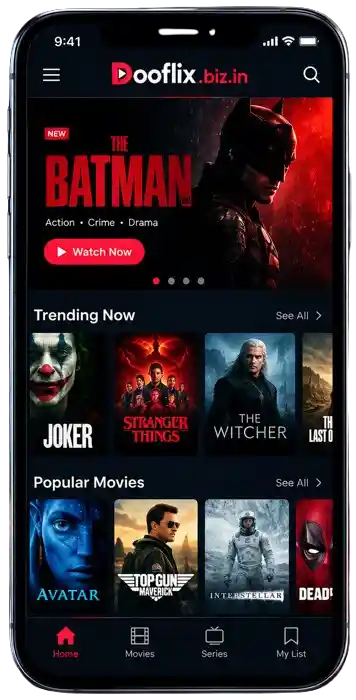
DooFlix is a simple entertainment app for Android users who want quick access to movies and TV shows. Want to find something good to watch without wasting time? Its clean layout makes browsing easy. Users can check different categories and look for titles that match their interests. The app keeps navigation simple. So, you can move through the available content without much effort. Moreover, the viewing experience may change with new updates. Therefore, check the latest version before installing the app. Also, review its permissions and use a trusted source. This can help protect your device from unwanted files. Overall, it offers a convenient way to browse entertainment on Android. Its simple design and easy navigation make it suitable for users who prefer a straightforward viewing experience.
DooFlix App is designed for users who want a simple way to manage their entertainment on Android. It provides a familiar app-style experience with clear sections and easy controls. Users can open the app, browse the available options, and adjust settings when needed. Moreover, its performance can depend on the device and installed version. A stable internet connection may also improve loading and playback. However, users should check app permissions before giving access to device features. It is also important to keep the application updated when a trusted release becomes available. This can improve compatibility and fix common issues. Overall, the app focuses on keeping the user experience simple and easy to navigate.
DooFlix APK is an Android package file that lets users install the app manually on compatible devices. It can be useful when the app is not available through the usual app store. The file works as an alternative installation method. Before installing it, users should check the Android version required by the file. Also, make sure the device has enough free storage. Android may ask you to allow installations from unknown sources. However, this setting should only be enabled when you trust the file source. After installation, you can manage the app like other Android applications. Always check the file version and permissions before starting the installation.
Simple and Clean Interface
A simple interface helps users find content without confusion. The layout keeps menus clear and easy to understand. You can move between sections with a few taps and quickly reach the content you want. Before starting the
DooFlix App , check your device space and Android version. This makes setup easier and avoids common installation issues.
Fast Content Search
Fast Content Search makes it easier to find a movie or show without scrolling through long lists. Users can type a title or related term into the search bar. The app then shows matching results in a simple layout. This saves time and keeps browsing smooth. It also helps users reach their preferred content faster.
Movies and TV Shows
duflex gives users an easy way to browse movies and TV shows in one place. You can check different titles and explore content based on your interests. The app keeps the browsing process simple. Also, clear sections help users find something to watch without spending too much time searching through long lists.
Smooth Video Playback
Smooth Video Playback helps users enjoy movies and shows without constant pauses. The player starts content quickly when the connection works well. Users can also adjust playback settings when available. A stable internet connection improves the experience. Moreover, keeping the app updated can help avoid common playback issues and support better performance.
Multiple Content Categories
duplex app users can explore different content categories in one place. The app organizes available movies and shows into clear sections. This makes browsing easier and saves time. You can switch between categories based on your mood or interest. Also, organized sections help you find suitable content without checking long lists.
Easy Navigation
Easy Navigation helps users move through the app without confusion. Clear menus make each section simple to reach. You can open categories, search for titles, and return to the main screen with a few taps. Moreover, the layout keeps important options easy to find. This saves time and makes everyday browsing more comfortable.
Regular Updates
dooflix apk download users can check for newer releases to get recent fixes and improvements. Updates may improve app stability, fix small bugs, and support newer Android versions. They can also refresh certain app functions. Therefore, check the version details before updating. Using a recent release can help maintain better compatibility and smoother daily use.
Android Compatibility
Android Compatibility helps the app work properly on supported devices. Users should check the required Android version before installation. Newer releases may support recent system versions and improve device performance. However, compatibility can vary by release. Therefore, check the app requirements first. This simple step can prevent installation errors and other common issues.
Lightweight App Experience
doflex app offers a lightweight experience for users who prefer simple applications. It can take up less storage than heavier entertainment apps, depending on the version. This may help users manage limited device space. Also, a lighter setup can make navigation feel quicker. However, performance still depends on your phone’s hardware and available storage.
Simple Playback Controls
Simple Playback Controls make watching content easier for users. You can play, pause, or resume a video with a few taps. The player keeps the main options easy to find. Also, users can adjust playback settings when available. This simple setup helps you control videos without dealing with confusing menus or extra steps.
DooFlix Mod APK is a modified version of the standard Android package. Developers may change certain parts of the original app to add extra options or remove some limits. These changes can differ between releases. So, users should check what a specific modified version actually offers. Some files may include altered settings, while others may change access to certain features. However, modified packages can carry extra security risks because an unknown party may have changed the original code. Therefore, check the source before installing any file. Also, review permissions and scan the package when possible. This helps you make a safer choice when trying a modified Android application.
Dollyflix can offer useful entertainment features, but users should still consider security before installing a modified APK. Download files only from trusted sources and check the app permissions carefully. Avoid giving access to sensitive data unless it is necessary. Keeping your device updated and using a security scanner can also help reduce potential risks.
No Registration Required
No Registration Required makes the setup process quicker for users. Duflix lets users access the app without creating an account first. This saves time during initial use. You can open the app and check available options directly. However, some features may still require account access or vary by version. Therefore, check the current app details before using it for entertainment.
Flexible Streaming Options
Flexible Streaming Options give users more control over how they watch content. You can choose suitable playback settings when available. This can help match the experience to your device and internet speed. Moreover, users can adjust their viewing preferences as needed. A stable connection also helps reduce buffering and keeps streaming more consistent during playback.
Better Download Control
Better Download Control gives users more flexibility when saving available content. With dooflix download, users can manage files more easily and choose suitable options when available. This feature can help organize saved videos on the device. Moreover, users can monitor download progress and manage storage. A stable internet connection can also make the process faster and smoother.
Custom Video Quality
Custom Video Quality lets users adjust the picture based on their needs. You can choose a suitable quality level when the option is available. Lower quality can use less data, while higher quality can look clearer. This gives users more control over streaming. Also, choosing the right setting can help reduce buffering on slower connections.
Background Playback
Background Playback lets users keep supported content playing while using other apps. Duflex app can continue playback when this feature is available. This helps when you want to check messages or browse another screen. You can keep the audio running without staying on the video page. However, support may vary by device and installed version, so check settings first.
Subtitle Support
Subtitle Support helps users follow dialogue while watching videos. You can turn subtitles on when they are available for the selected content. This can make scenes easier to understand, especially when audio sounds unclear. It also helps viewers follow different languages. However, subtitle options may vary by video and app version.
Quick Resume Option
Dofix helps users return to a video without starting from the beginning. The resume feature can remember your last playback position when supported. You can reopen the same content and continue watching from where you stopped. This saves time and makes viewing easier. Also, it can be useful when you pause a video and return later for another session.
Personalized Viewing Settings
Personalized Viewing Settings let users adjust the viewing experience to match their needs. You can change available playback options, screen settings, or other preferences. This gives you more control while watching content. Moreover, simple settings help create a comfortable setup for different devices. Options may vary by version, so check the available settings before use.
Low Data Usage
Dooflix APK download latest version helps you stream your favorite movies and shows while using less mobile data. You can lower the video quality when your data plan is limited. This makes streaming more practical on mobile networks. It also helps reduce unnecessary data use during longer viewing sessions.
Screen Casting Support
Screen casting lets you watch content on a larger display with ease. You can connect your mobile device to a compatible TV or screen. This feature makes movies and shows more enjoyable with family or friends. It also gives you a simple way to move playback from your phone to a bigger screen.
The Duplex app download gives you a simple way to access movies and shows on your mobile device. Once the app is installed, you can browse content, choose a title, and start watching with a few simple steps.
Open the App
Launch the app after installation. The home screen shows available movies, shows, and other content. Take a moment to explore the main sections.
Browse Available Content
Use the categories to find content by genre or type. You can explore movies, TV shows, action, comedy, drama, horror, and other sections based on your interests.
Search for a Title
Use the search option when you already know what you want to watch. Enter the movie or show name and check the available results.
Select a Movie or Show
Dolfix makes it easy to choose a movie or show from the available titles. Tap the title you want to watch and check its details before starting playback. You may see information such as the genre, description, and available episodes.
Start Watching
Choose the play option to begin watching. Make sure your internet connection remains stable for smoother playback.
Adjust Video Quality
Select a suitable video quality based on your connection. Lower quality can help reduce data use, while higher quality can provide a clearer picture on supported devices.
Use Playback Controls
Use the playback controls to pause, resume, or move through the video. You can also adjust the volume and other available viewing settings.
Watch on a Bigger Screen
Duplix can make viewing more convenient when you want to enjoy content on a larger display. If the app supports casting, connect your compatible TV or screen and move playback from your phone to the bigger display.
doorfix offers a wide mix of entertainment for different viewing preferences. You can explore movies, series, and shows by genre. The category-based layout makes it easier to find something that matches your mood.
Movies
Explore movies from different genres and styles. You can find popular titles, recent releases, and entertaining films for different tastes.
TV Shows and Series
Watch TV shows and series across different genres. Browse episodes and seasons to continue your favorite stories without searching for each episode separately.
Action
Action content brings fast-paced stories, intense scenes, and exciting adventures. It is a good choice when you want something energetic and engaging.
Comedy
Comedy movies and shows offer light entertainment with funny characters and enjoyable stories. Pick this category when you want something easy and relaxing to watch.
Drama
Drama focuses on emotional stories, relationships, and personal struggles. These titles often feature strong characters and storylines that keep you interested.
Romance
Romance content explores love, relationships, and emotional connections. You can find stories that range from light romantic moments to deeper relationship-based plots.
Thriller
Thrillers keep the story moving with suspense, mystery, and unexpected events. This category suits viewers who enjoy tense plots and surprising twists.
Horror
Horror titles bring scary stories, dark settings, and suspenseful moments. They are ideal for viewers who enjoy supernatural themes and frightening situations.
Science Fiction
Science fiction explores futuristic ideas, advanced technology, space, and unusual worlds. These stories can offer a mix of imagination, action, and mystery.
Adventure
Adventure content follows characters through exciting journeys and difficult challenges. You can find stories involving exploration, travel, survival, and discovery.
Animation
Animated movies and shows use creative visuals to tell different types of stories. The category includes entertaining options for animation fans of different ages.
Documentary
Documentaries focus on real people, events, places, nature, and interesting subjects. They provide informative content while keeping the viewing experience engaging.
Family
Family content offers simple and enjoyable stories for shared viewing. You can find movies and shows with friendly themes that work well for family entertainment.
Popular Content
Popular titles make it easier to discover content that many viewers are watching. This section can help when you want a quick option without browsing every category.
New Releases
The new releases section highlights recently added content. It helps viewers discover fresh movies and shows without spending too much time searching.
Doflex brings updates that can improve the overall app experience. New releases often focus on small changes that make the application easier to use. Instead of adding too many changes at once, developers may improve existing functions and fix issues from earlier builds. The exact changes can vary between releases, so users should check the version details before updating.
Improved Stability
The latest release may fix minor crashes and unexpected errors. As a result, the app can work more reliably on supported devices.
Smoother Navigation
Updates can improve movement between menus and sections. This makes it easier to find the options you need.
Interface Changes
Developers may adjust buttons, menus, or page layouts. These changes can make the interface cleaner and easier to understand.
Better Android Support
New builds may improve compatibility with recent Android versions. This helps the app work properly on more supported devices.
Bug Fixes
Earlier releases can have small issues. Therefore, updates may fix playback errors, loading problems, or other reported bugs.
Performance Improvements
Some updates focus on how the app uses device resources. Better performance can reduce delays and make everyday use smoother.
Updated Content Sections
The latest build may also refresh certain sections or improve how available content appears. However, the exact changes depend on the release.
Easier Updates
Keeping the application updated can help users access recent fixes and improvements. Before installing a new file, check its version number, source, and Android requirements.
Overall, the latest release may offer practical improvements rather than major changes. Check the official release information or a trusted source for the exact features included in your version.
duplex movie app users can explore several other streaming platforms for movies and TV shows. Each option has its own content library, features, and pricing. Here are 10 popular alternatives to consider.
Netflix
Netflix offers a large collection of movies, TV shows, documentaries, and original content. It supports multiple devices and provides different viewing options based on the plan.
Amazon Prime Video
Prime Video features movies, TV series, original shows, and other entertainment. Users can browse different genres and watch content on supported devices.
Disney+
Disney+ focuses on family entertainment, movies, series, and original shows. Its library includes content from several well-known entertainment brands.
Hulu
Hulu provides movies, TV shows, original series, and other streaming content. It can be a useful choice for viewers who enjoy both current and older shows.
Max
Max offers movies, TV series, documentaries, and original programming. Its library covers many genres, including drama, comedy, action, and more.
Peacock
Peacock provides movies, shows, live content, and original programming. It offers a mix of entertainment for different viewing preferences.
Tubi
Tubi is an ad-supported streaming service with a large selection of movies and TV shows. Users can browse different genres without paying a traditional subscription fee.
Pluto TV
Pluto TV combines live channels with on-demand movies and shows. Its simple channel-based layout makes it useful for viewers who enjoy a traditional TV experience.
Crunchyroll
Crunchyroll focuses mainly on anime and related entertainment. It offers a wide selection of anime series, movies, and other content for fans of the genre.
Paramount+
Paramount+ includes movies, TV shows, original series, and other entertainment. Its library covers genres such as comedy, drama, action, and family content.
dooflix application users may sometimes face playback, installation, or connection problems. Most issues have simple fixes. Below are some common problems and practical solutions.
App Not Installing
Check that your Android device has enough free storage. Also, make sure the APK file is compatible with your Android version. If the installation still fails, download the file again from a trusted source.
App Keeps Crashing
Restart your phone and open the app again. If the problem continues, clear the app cache from your device settings. You can also reinstall the latest compatible version.
Videos Not Playing
First, check your internet connection. Try switching between Wi-Fi and mobile data. If other videos work normally, restart the app and try playing the title again.
Slow or Buffering Videos
A weak connection can cause frequent buffering. Move closer to your Wi-Fi router or switch to a more stable network. Lowering the video quality may also improve playback.
App Not Opening
Restart your device and try again. If the issue remains, check whether your Android version supports the app. Clearing the cache can also help resolve temporary errors.
Audio or Video Problems
Check your device volume and media settings first. Then restart playback. If the problem affects only one title, try another video to see if the issue continues.
Casting Not Working
Make sure your phone and compatible TV or display use the same Wi-Fi network. Restart both devices and check that casting is supported by the app.
App Running Slowly
Close unused apps running in the background. Then clear the app cache and restart your device. Keeping enough free storage can also help improve performance.
Downloaded File Not Working
The APK file may be incomplete or incompatible with your device. Remove the damaged file and use a trusted source to obtain a compatible version.
Permission Errors
Review the permissions requested by the app before granting access. Only allow permissions that are necessary for the app to work properly.
To download the APK on Android, first find a reliable source for the APK file. Check the file details and make sure your phone has enough storage. Next, the duflex app download process starts when you save the APK to your device. Open the downloaded file and follow the installation instructions. If Android asks for permission, allow installation from the selected source in your settings. Then return to the APK file and complete the setup. Finally, open the APK, review its permissions, and use the app only when you trust the source.
Steps:
- Find a reliable APK source.
- Download the APK file.
- Open the downloaded file.
- Allow installation when required.
- Complete the installation.
- Review app permissions.
To install the APK on Android, first make sure the file is saved on your phone. Before you start, check that the file comes from a source you trust. The duplex download process should use a file that you have checked for safety. Next, open your phone settings and allow installation from the selected source if required. Then open the APK file and tap the Install button. Wait for the setup to finish. Finally, open the app and review its permissions before using it.
Steps:
- Save the APK file.
- Check the file source.
- Allow installation if required.
- Open the APK file.
- Tap Install.
- Wait for setup to finish.
- Review app permissions.
Pros
- Easy to use
- Wide content library
- Multiple categories
- Quick search
- HD quality options
- Simple playback controls
- Screen casting support
- Mobile-friendly interface
- Easy content browsing
- Convenient streaming
Cons
- Security risks
- Content may change
- Some features may fail
- Requires internet access
- Updates may be needed
- Regional limits may apply
Duofix offers a simple way to explore movies and TV shows from different categories. Its easy interface helps users find content without much effort. You can search for titles, adjust playback settings, and enjoy supported features such as screen casting. However, users should also consider security when using modified APK files. Always check the source before installing any file on your device. Also, review app permissions and keep your Android device updated. Overall, Duofix can provide a convenient entertainment experience for users who want different viewing options. Choose trusted sources and use the app carefully for a safer experience.
What is Dooflix APK? +
It is an Android APK file associated with an app that provides access to movies and TV shows. Available content and features may vary by version.
What is the primary function of DooFlix? +
Its main purpose is to provide a way to browse and access available entertainment content. The exact features can depend on the version being used.
Is DooFlix free to use? +
Some versions may be offered without a standard subscription. However, pricing, access, and available features can change by version or source.
Can I install DooFlix on my iPhone (iOS)? +
An APK file is made for Android and cannot be installed directly on iOS. An official iOS version would be required for iPhone or iPad use.
Is DooFlix safe for my phone? +
Safety cannot be confirmed for every APK file. Check the source, scan the file, and review its requested permissions before installing it.
Does DooFlix stream movies directly? +
This can depend on the version and how its content is provided. Check the specific release for its current playback options.
Can I use Dooflix on Android? +
The APK format is intended for Android devices. However, compatibility can vary with the Android version and the specific release.
Can I download videos in Dooflix? +
Offline downloads are not guaranteed across all versions. Check the app’s current features to see whether supported titles can be saved.
Is subtitle support available in Dooflix? +
Subtitle availability may vary by title and version. Check the playback settings to see whether subtitles are offered for a particular video.